Handling application lifetime events for a hosted service

The IApplicationLifetime interface allows hosted services to gracefully handle startup and shutdown events. It has three properties of type CancellationToken.

  • ApplicationStarted
  • ApplicationStopping
  • ApplicationStopped

You can register callbacks for one or more of those notifications.

public HostedService(
  ILogger<HostedService> logger, 
  IApplicationLifetime applicationLifetime)
{
    _logger = logger;
    _applicationLifetime = applicationLifetime;
}

public Task StartAsync(CancellationToken cancellationToken)
{
    _logger.LogInformation("Entering StartAsync");

    _applicationLifetime.ApplicationStarted.Register(OnStarted);
    _applicationLifetime.ApplicationStopping.Register(OnStopping);
    _applicationLifetime.ApplicationStopped.Register(OnStopped);

    _timer = new Timer(
        ScheduledTask,
        this,
        TimeSpan.FromSeconds(3),
        TimeSpan.FromSeconds(3));

    return Task.CompletedTask;
}

public Task StopAsync(CancellationToken cancellationToken)
{
    _logger.LogInformation("Entering StopAsync");

    return Task.CompletedTask;
}

private void OnStarted()
{
    _logger.LogInformation("OnStarted called.");
}

private void OnStopping()
{
    _logger.LogInformation("OnStopping called.");
}

private void OnStopped()
{
    _logger.LogInformation("OnStopped called.");
}

The IApplicationLifetime interface also has a StopApplication method which unsurprisingly does just that, which is to terminate the current application.

private void ScheduledTask(object state)
{
    var source = state as HostedService;

    _logger.LogInformation($"ScheduledTask invocation {source._count} via timer.");

    if (source._count++ == 3)
    {
        _logger.LogInformation("Shutting down...");
        source._applicationLifetime.StopApplication();
    };
}

The screenshot below shows the order in which these notifications are fired. It’s quite intuitive and just as you’d expect.
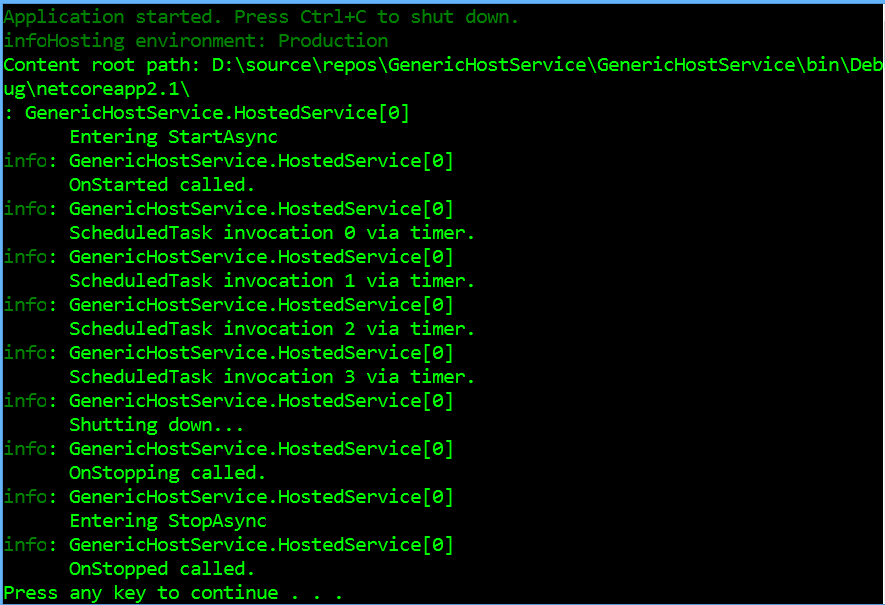
IHostedService application lifetime

Generic hosted services in .NET Core using IHost and IHostedService

An approach used to simulate a long running or permanently running background task for cloud services is to deploy a REST API, and to invoke end-points on the API from a cloud-native event handler (AWS Lambdas or Azure Functions). When migrating on-prem Windows services, people would take this approach when the other option would have been to host their service in a virtual machine (AWS EC2 or Azure VM). .NET Core 2.1 has introduced a simpler alternative via the IHost and IHostedService interfaces.

The core idea here is to use the ASP.NET Core framework but without the HTTP engine. The current long term goal is to make this the default (so in future, even web-apps will use the generic host mechanism). So from that perspective, it’s not a bad idea to start using it preemptively. Here’s a really simple fully functional ASP.NET Core generic host service. All it does it launch a timer proc every 5 seconds. Think of it as the equivalent of a scheduled task.

class MyHostedService : IHostedService
{
    public static async Task Main(string[] args)
    {
        await new HostBuilder()
            .ConfigureServices((context, services) =>
            {
                services.AddLogging();
                services.AddHostedService<MyHostedService>();
            })
            .ConfigureLogging((context, logging) =>
            {
                logging.AddConsole();
            })
            .UseConsoleLifetime()
            .Build()
            .RunAsync();
    }

    ILogger<HostedService> _logger;

    public MyHostedService(ILogger<HostedService> logger)
    {
        _logger = logger;
    }

    public Task StartAsync(CancellationToken cancellationToken)
    {
        new Timer(
            state => { _logger.LogInformation("Timer invoked"); },
            this,
            TimeSpan.FromSeconds(0),
            TimeSpan.FromSeconds(5));

        return Task.CompletedTask;
    }

    public Task StopAsync(CancellationToken cancellationToken)
    {
        return Task.CompletedTask;
    }
}